Repository README
Note
This is the existing repository README, included directly to avoid a second copy. For the current audit of runtime support, see capabilities.
iPHASimulator v2 is a notebook-driven Python toolkit for building, validating, parameterising, simulating, preprocessing, and analysing polyhydroxyalkanoate (PHA) oligomer systems.
The current v2 workflow focuses on reproducible PHA molecular simulation preparation. It starts from chemically defined PHA oligomers, exports structure files, prepares Amber/GAFF2 and GROMACS/OpenMM simulation inputs, supports HPC execution patterns, and provides early analysis and PHA-enzyme docking preparation notebooks.
This software has been developed by King’s College London under the frame of SATISPHACTION project (https://satisphaction.eu/). SATISPHACTION is a 4-year project awarded in 2025 under the highly competitive EIC Pathfinder Challenge call “Nature-inspired alternatives for food packaging and films for agriculture”. It focuses on developing next-generation, fully biodegradable PHA-based materials for food packaging that replace fossil-based plastics and promote circular economy.
Launch the GUI
From the repository root, launch the Streamlit interface with:
python -m streamlit run pha_gui.py
What It Does
iPHASimulator v2 currently provides:
RDKit-based PHA oligomer generation for curated common PHAs and custom 3-hydroxy acid monomers.
Validation and visualisation of generated oligomer structures.
PDB and SDF export for downstream molecular simulation workflows.
AmberTools/GAFF2 parameterisation for PHA oligomers.
OpenMM and GROMACS workflow preparation for dry and solvated systems.
HPC workflow helpers for repeatable simulation execution.
GROMACS trajectory preprocessing for analysis-ready trajectories.
Basic polymer trajectory analysis.
Residue-to-PHA minimum-distance heatmaps and sampled contact occupancies for existing enzyme–PHA trajectories; see the contact workflow.
PHA-enzyme docking input preparation for manual HADDOCK workflows.
DFT workflows are not documented as a current v2 capability.
Workflow Overview
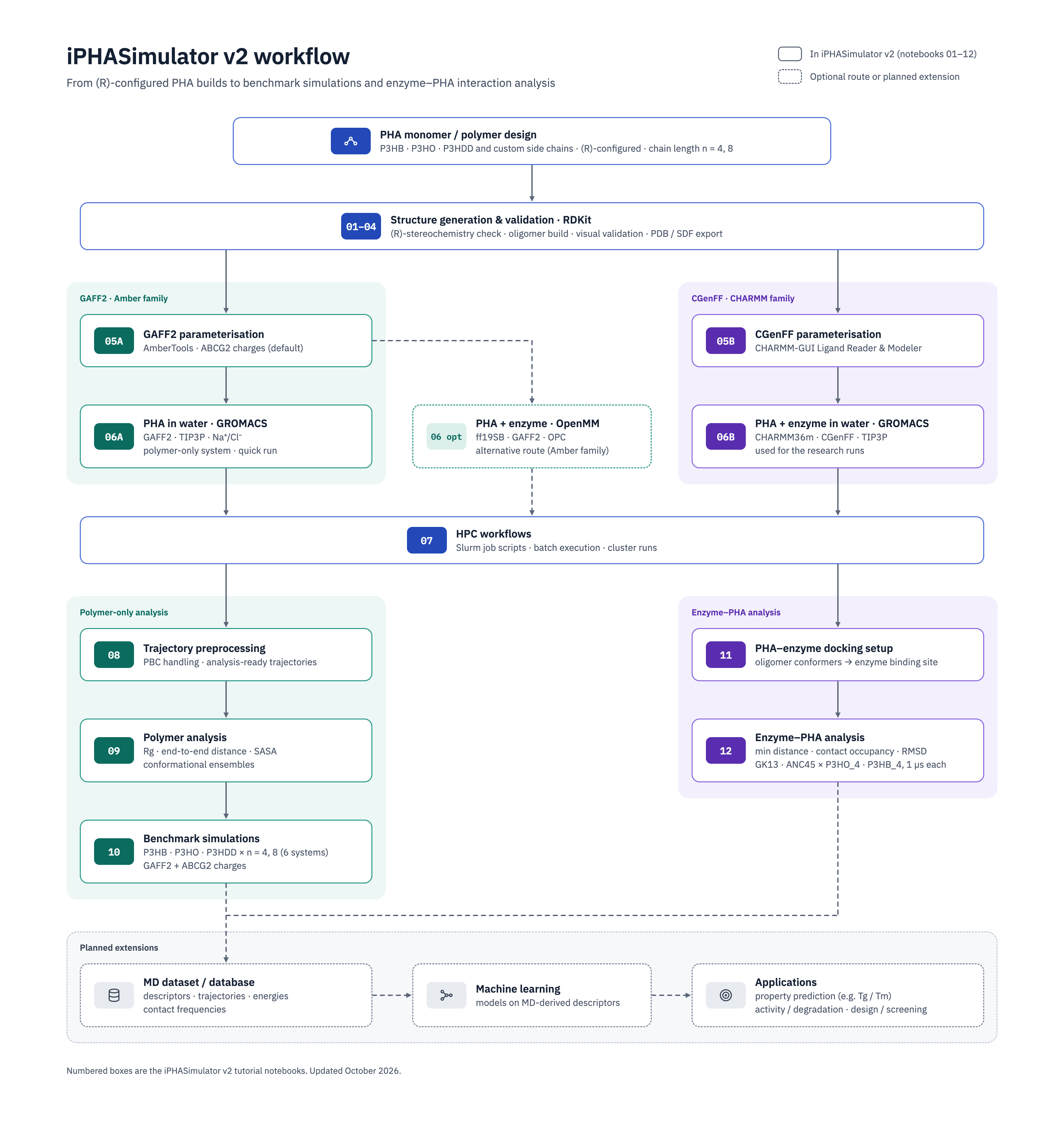
Numbered boxes correspond to the tutorial notebooks; dashed outlines indicate optional routes or planned extensions. See the notebook catalogue for prerequisites and run order.
Design -> validation -> structure export -> parameterisation -> MD simulation
       -> trajectory preprocessing -> analysis -> PHA-enzyme docking
The repository is organised around guided notebooks. Reusable code lives in
src/iphasimulator; notebooks should remain workflow tutorials rather than the
home of core package logic.
Naming Convention
iPHASimulator uses one central naming convention for PHA identifiers:
Meaning |
Examples |
|---|---|
Monomer / residue code |
|
Polymer code |
|
Single oligomer chain with n repeat units |
|
Multi-chain system |
|
Head/main/tail residue database entries |
|
Use src/iphasimulator/naming.py to generate and validate names instead of
typing names manually in notebooks or scripts.
Current Status
Area |
Status |
Notes |
|---|---|---|
Polymer generation |
Working |
Curated PHA names, side-chain based generation, and custom monomers are implemented in |
GAFF2/Amber parameterisation |
Working |
AmberTools workflow writes GAFF2 |
CHARMM/CGenFF parameterisation |
Manual website workflow + checks |
|
GROMACS/OpenMM MD workflows |
Working/in progress |
Dry OpenMM and GROMACS preparation are working; solvated workflows and production-style routes are under active development by notebook. |
HPC workflow |
Working |
YAML/SLURM-oriented helpers and notebook guidance are present for staged runs. |
Polymer analysis |
Working |
Basic analysis notebook supports analysis from preprocessed trajectories. |
PHA-enzyme docking preparation |
Working/in progress |
Notebook |
Enzyme-polymer MD |
Planned |
Docked complexes are not yet converted into enzyme-polymer MD systems. |
ML/database functionality |
Planned |
Reusable databases and ML-backed workflows are future work. |
Installation
iPHASimulator v2 is installed from the GitHub repository: MMLabCodes/iPHAsimulatorV2.
These instructions assume you are using a terminal on Linux, macOS, or Windows
with WSL. The terminal is the application where you type commands such as
conda activate ... and python ....
1. Install Conda
Install Miniconda or Anaconda first if conda is not already available on your
computer. Conda is not normally installed with pip; it is a separate Python
and software environment manager. Conda creates an isolated environment, so the
packages for iPHASimulator v2 do not interfere with other Python projects.
Recommended options:
Miniconda: smaller download, recommended if you only want the package manager and will install packages as needed.
Anaconda: larger download, includes many scientific Python packages by default.
For most users, Miniconda is enough:
Open the Miniconda download page: https://docs.conda.io/en/latest/miniconda.html
Download the installer for your operating system.
Run the installer and accept the default options unless your institution has specific instructions.
Close and reopen the terminal after installation.
On Windows, this project is easiest to use through WSL because AmberTools and many MD tools are Linux-oriented. Install Miniconda inside the WSL terminal, not only in the normal Windows command prompt.
After installing Conda, open a new terminal and check that it works:
conda --version
2. Download iPHASimulator v2
The easiest way to download the repository is with git. First check whether
git is installed:
git --version
If that command is not found, install Git. If Conda is working, one simple route is:
conda install -c conda-forge git
If Conda asks Proceed ([y]/n)?, type y and press Enter.
Choose a folder where you keep research software, then download the repository from GitHub:
cd ~
git clone https://github.com/MMLabCodes/iPHAsimulatorV2.git
cd iPHAsimulatorV2
If you do not use git, open the GitHub page in a browser, click Code,
choose Download ZIP, unzip the folder, and then open a terminal inside the
unzipped folder. The folder may be named iPHAsimulatorV2 or
iPHAsimulatorV2-main, depending on how it was downloaded
3. Create and Activate the Environment
Create a new conda environment with Python 3.11:
conda create -n iphasimulator_v2 python=3.11
conda activate iphasimulator_v2
If conda asks Proceed ([y]/n)?, type y and press Enter.
When the environment is active, your terminal prompt should usually start with
(iphasimulator_v2).
4. Install the Python Package
The Python dependencies are declared in pyproject.toml. You do not need to
type every Python package name manually. From the repository root, run:
python -m pip install -e ".[dev,md,gui]"
This command tells pip to read pyproject.toml and install:
the core
iphasimulatorpackage;the main Python dependencies such as RDKit, numpy, pandas, scipy, networkx, and pyyaml;
the
devtools, including pytest and JupyterLab;the
mdtools, including OpenMM, ParmEd, and MDTraj;the
guitools, including Streamlit for the graphical interface.
The -e option means “editable install”. This is useful for development because
changes made in src/iphasimulator/ are used immediately without reinstalling
the package.
5. Check the Python Installation
Run these commands from the same activated environment:
python -c "import iphasimulator; print('iPHASimulator import OK')"
python -c "from rdkit import Chem; import openmm; import parmed; import mdtraj; import streamlit; print('Python dependencies OK')"
6. Start the Graphical Interface
The graphical interface is provided by pha_gui.py and requires Streamlit.
Streamlit is installed automatically when you use the
python -m pip install -e ".[dev,md,gui]" command above.
Activate the same Conda environment, move to the repository root, and start the interface with:
conda activate iphasimulator_v2
python -m streamlit run pha_gui.py
Use python -m streamlit run pha_gui.py, not python pha_gui.py. Streamlit must
start its web server before the interface can work. Your web browser should open
automatically, normally at http://localhost:8501. Press Ctrl+C in the
terminal when you want to stop the server.
If Python reports No module named 'streamlit', confirm that the correct Conda
environment is active and install the GUI dependencies again:
conda activate iphasimulator_v2
python -m pip install -e ".[gui]"
7. Check External Simulation Tools
Some notebooks call external command-line programs. These are not ordinary Python imports, so they may need to be installed separately in the same conda environment:
AmberTools for GAFF2 parameterisation (
antechamber,parmchk2,tleap);GROMACS for GROMACS MD workflows (
gmx);Open Babel for optional structure conversion (
obabel).
Check whether they are available:
which antechamber
which tleap
which gmx
which obabel
gmx --version
obabel -V
If any command is missing, install that external tool before running the notebooks that require it. For example, AmberTools, GROMACS, and Open Babel are available from conda-forge:
conda install -c conda-forge ambertools gromacs openbabel
After installing them, check again:
which antechamber
which tleap
which gmx
which obabel
gmx --version
obabel -V
8. Merge Restarted GROMACS Outputs
Long GROMACS simulations may produce several trajectory (.xtc) and energy
(.edr) files after restarts. The merge module discovers the initial
step7_production files, the optional unnumbered step8_production_2us files,
and numbered continuation files such as part0002 and part0003.
The module can be run directly inside the directory containing the XTC and EDR files. First change into that directory and perform a dry run:
cd /path/to/system_directory
python -m iphasimulator.trajectory_gromacs_merge --dry-run
The dry run prints the numerically ordered input files and planned commands but does not run GROMACS. Review that list carefully. To perform both trajectory and energy merging, run:
python -m iphasimulator.trajectory_gromacs_merge
Alternatively, pass the simulation directory while working elsewhere:
python -m iphasimulator.trajectory_gromacs_merge /path/to/system_directory
The trajectory filename records the highest continuation part included. For
example, if part0003 is the highest discovered XTC part, the outputs are:
production_combined_003.xtc
production_combined_003.edr
Both output suffixes record the highest part included in their respective merge.
The suffix is numeric: part0009 produces _009.xtc or _009.edr, and
part0010 produces _010.xtc or _010.edr. An unnumbered
step8_production_2us file is treated as continuation 1; a step-7-only output
uses _000.
The module runs gmx check on every input and validates the final outputs. It
preserves the original files, does not infer times from filenames, and does not
use -settime. Existing combined outputs are protected by default.
Optional flags:
--trajectory-only   Merge only XTC files.
--energy-only       Merge only EDR files.
--skip-check        Skip input and output gmx check validation.
--overwrite         Allow replacement of existing combined outputs.
--dry-run           Print the planned commands without running GROMACS.
If continuation XTC files exist but continuation EDR files do not, the module still merges the trajectory and clearly reports that energy merging was skipped.
9. Start the Notebooks
Then start the notebooks from the repository root:
jupyter lab notebooks/
Generated structures, parameter files, simulation inputs, trajectories, and logs
are written under examples/output/, which is ignored by Git.
Testing the Installation
For the enzyme–PHA contact workflow, open
src/md_simulation_scripts/enzyme_contacts/enzyme_contacts.ipynb
or run python src/md_simulation_scripts/enzyme_contacts/run_enzyme_contacts.py src/md_simulation_scripts/enzyme_contacts/GK13_P3HO_4.yaml.
This defaults to a labelled preview. Add --full for every configured sampled
frame. Install the optional dependencies with python -m pip install -e ".[analysis]"
if needed. See configuration, verified inputs and validation
before interpreting results.
The main verification suite is in tests/. After installing the package, run the
tests from the repository root with pytest:
python -m pytest tests
Individual workflow areas can also be checked by running a specific test file:
python -m pytest tests/test_build_pha.py
python -m pytest tests/test_export.py
python -m pytest tests/test_md_workflow.py
python -m pytest tests/test_gromacs_runner.py
python -m pytest tests/test_trajectory_preprocessing.py
These tests cover the builder, monomer registry, stereochemistry, structure export, GAFF2 workflow helpers, GROMACS conversion/preparation helpers, HPC workflow helpers, and trajectory preprocessing utilities.
Required Dependencies
Dependency |
Purpose |
|---|---|
RDKit |
PHA molecule construction, stereochemistry handling, structure validation, and SDF/PDB export. |
AmberTools |
GAFF2 parameterisation through |
OpenMM |
Python-native MD validation and OpenMM simulation workflows. |
GROMACS |
GROMACS dry/solvated workflow execution and trajectory preprocessing. |
ParmEd |
AMBER-to-GROMACS topology conversion. |
MDTraj / MDAnalysis |
Trajectory handling and analysis support. |
pandas |
Workflow tables, status summaries, and analysis data frames. |
numpy |
Numerical calculations. |
matplotlib |
Notebook plots and basic analysis visualisation. |
Streamlit |
Browser-based graphical interface provided by |
Open Babel |
Optional structure format conversion support where needed. |
The package metadata also includes supporting Python dependencies such as
scipy, networkx, and pyyaml.
Repository Structure
notebooks/   Guided v2 workflow notebooks.
src/         Reusable `iphasimulator` Python package code.
examples/    Thin runnable scripts, YAML workflow examples, SLURM templates,
             and generated output under `examples/output/`.
docs/        Developer and design documentation.
tests/       Automated tests for builders, export, MD workflow helpers,
             GROMACS conversion, HPC helpers, and trajectory preprocessing.
Notebook Workflow
Read the execution cells before Run All: 05A currently enables GAFF2 parameterisation,
and 10 runs preparation/solvation/minimisation and can submit with sbatch.
06A, 06C and the quick dry check use default-off execution flags. 05B/06B
run their packaged input checks by default.
The notebooks are workflow modules, not a 01→12 sequence. Notebooks 01–04 build the PHA; then pick one workflow; 07 explains HPC execution; choose the relevant analysis or docking module.
PHA alone in water: 05A → 06A
Enzyme–PHA in water (the method used for the project’s research simulations): 05B → 06B
Optional enzyme–PHA alternative with OpenMM: 05A → 06C
Outside the main workflows:
Optional quick check of 05A parameters: 05A → 05A_quick_check_openmm (the GAFF2 files in OpenMM without water; not a physical result)
Both enzyme workflows need a docked enzyme–PHA complex PDB first; prepare the PHA input for
docking with 11_enzyme_docking_setup.ipynb. 06B reproduces the project’s research
simulations. 06C is a different force-field setup, so results are not directly comparable
with 06B. See the full 06B–06C comparison
for matched conditions, inputs, output formats and restart requirements.
Notebook |
Purpose |
Main output |
|---|---|---|
|
Introduce built-in PHA oligomer generation examples. |
Example RDKit PHA molecules for tutorial use. |
|
Select or define a PHA target from user-facing design inputs. |
A designed polymer target such as |
|
Validate generated oligomers and inspect molecular structures. |
Validation summaries and visual checks. |
|
Export validated oligomers to structure files. |
PDB/SDF files in |
|
Run AmberTools/GAFF2 parameterisation. |
|
|
Optional: check that the 05A GAFF2 files load, minimise and run a few steps in OpenMM without water (run flag off by default). |
Short OpenMM logs under |
|
Check the CHARMM-GUI CGenFF files for the PHA: all stereocentres R, parameter quality scores, CGenFF version; runs on the example dataset by default. |
✓/✗ checks of the |
|
Convert the 05A GAFF2 PHA to GROMACS (ParmEd) and add CHARMM-style TIP3P water with SOD/CLA: the polymer benchmark method. |
|
|
Prepare and check a CHARMM-GUI Solution Builder GROMACS package of an enzyme + polymer complex in water; runs on the example dataset |
A GROMACS run folder with |
|
Optional: build an enzyme + polymer complex (ff19SB + GAFF2, from the docked complex PDB) in OPC water at 303.15 K, 0.05 M NaCl and rectangular 3.0 nm padding, with 06B’s stage lengths; a different force-field setup from 06B. |
Posed polymer mol2, protein PDB, |
|
Prepare and document local/HPC staged execution. |
SLURM scripts, restart guidance, and benchmark execution notes. |
|
Reconstruct, center, wrap, and optionally fit GROMACS trajectories. |
|
|
Run basic polymer trajectory analysis. |
Analysis tables and plots for metrics such as radius of gyration and SASA. |
|
Launch and track multi-system MD benchmark preparation. |
Benchmark outputs under |
|
Prepare the PHA input for manual enzyme docking from the benchmark folder |
Docking-ready polymer PDBs and manual HADDOCK job records under |
|
Stability diagnostics for one enzyme–polymer GROMACS production run. |
Total energy, protein backbone RMSD and polymer RMSD plots. |
Minimal P3HB_4 Benchmark Workflow
P3HB_4 is the default small benchmark system for checking the v2 workflow.
Install the environment and start Jupyter:
conda activate iphasimulator_v2
jupyter lab notebooks/
Run notebooks
01to04using the P3HB tetramer target. The expected exported structure names are:examples/output/polymer_structures/P3HB_4.sdf examples/output/polymer_structures/P3HB_4.pdb
Run
05A_amber_gaff2_parameters.ipynbwithP3HB_4as the target. The expected Amber/GAFF2 outputs are written under:examples/output/md_tests/P3HB_4/gaff2/
Run the relevant MD notebook for the route being tested:
06A_gaff2_gromacs_pha_in_water.ipynbfor the PHA in water with GROMACS (the polymer benchmark method).Optional:
05A_quick_check_openmm.ipynbfor a fast OpenMM check of the GAFF2 files without water.
For production-style GROMACS trajectories, continue with:
07_hpc_execution.ipynbfor local/HPC execution guidance.08_trajectory_preprocessing.ipynbto generate analysis-ready trajectories.09_solvated_polymer_analysis.ipynbfor basic trajectory analysis.11_enzyme_docking_setup.ipynbonly after suitable production structures are available.
Developer Documentation
Roadmap
Reusable PHA residue database.
Head/main/tail building blocks for more robust polymer assembly.
Mixed PHA sequences and sequence-aware validation.
Enzyme-polymer MD workflows from reviewed docking poses.
ML potential and database support for future screening workflows.
Citation and Acknowledgements
Citation information will be added before publication or formal release. Until then, please cite the repository URL and acknowledge the iPHASimulator v2 development team and SATISPHACTION project funding (EIC Pathfinder) when using this software in research outputs.
Funded by the European Union. Views and opinions expressed are however those of the author(s) only and do not necessarily reflect those of the European Union, European Innovation Council and SMEs Executive Agency (EISMEA). Neither the European Union nor the granting authority can be held responsible for them